Vetasur · Practice software by Dreamseven
Your practice.
Your workflow.
With Vetasur.
Patient records, treatment, the in-house pharmacy and billing in one practice interface. Add VetRobot, an owner portal and imaging integrations as needed. Work on a computer, tablet or during visits.
Personal setup · Your own templates · Usable without generative AI
A connected practice workflow
Patient, history and appointment.
Clinical findings and VetRobot in the case.
Treatment plan, pharmacy and dispensing.
Follow-up care, owner and invoice.
One patient. A connected record. Your team.
From first contact to follow-up care
One case. A clear workflow.
Assign information once and find it at the next step. Vetasur connects reception, clinical work and administration.
01
Register
Register the owner and animal together.
02
Plan
Coordinate appointments, rooms and staff.
03
Treat
Connect clinical findings with the next steps.
04
Dispense
Document prescriptions and stock.
05
Bill
Review services delivered.
06
Follow up
Plan follow-up checks and callbacks.
Practice management built around your work
Room to do more.
Easy to navigate.
Explore the main areas at a glance. Open a section for its features, optional modules and requirements.
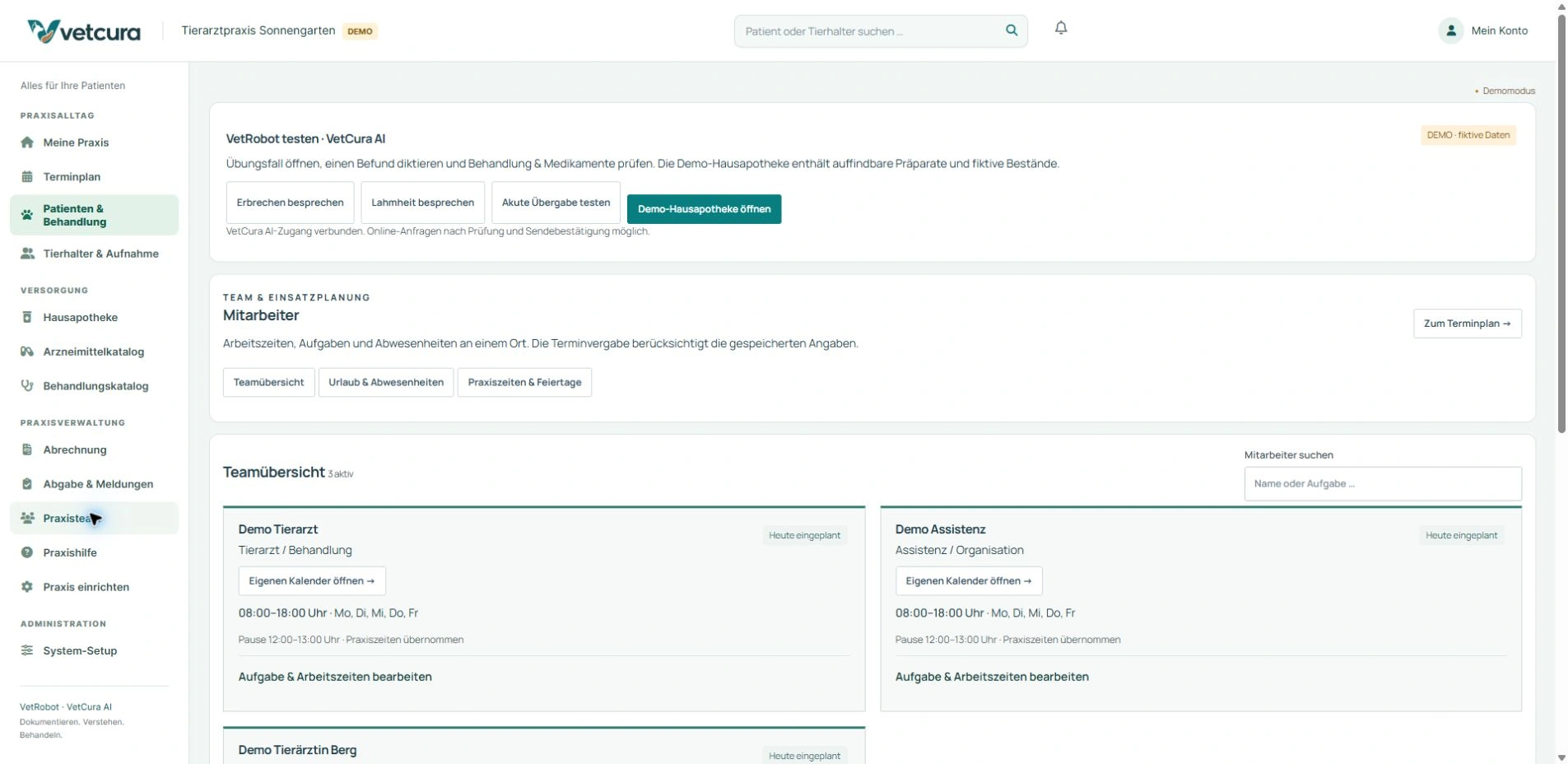
Appointments, intake and team.
Individual calendars, rooms and responsibilities give reception a shared view of the practice day.
Patient records and history.
Keep risks, previous findings, medication and follow-up care with the right animal, with earlier visits easy to find.
Consultations and clinical notes.
From the reason for the visit to a reviewed plan, with your own templates, local question guides and explicit approvals.
Medication. Stock. Traceability.
Review products and rules, approve prescriptions and record actual dispensing against the batch and stock.
Lab, imaging and PACS.
Keep results and image series with the case. A separate imaging server can add PACS and a native DICOM worklist.
GOT fees, invoices and administration.
Collect services actually delivered and materials used, review the draft invoice and continue the billing workflow.
Surgery, inpatient care and handover.
Record stays, tasks and observations so the next shift can continue the patient’s care.
Owner portal and follow-up care.
Clients can prepare for visits and find published guidance. Your team controls which animals and information each account can access.
Permissions, backups and operations.
Individual accounts, controlled sharing and an agreed backup plan. We help with setup and ongoing support.
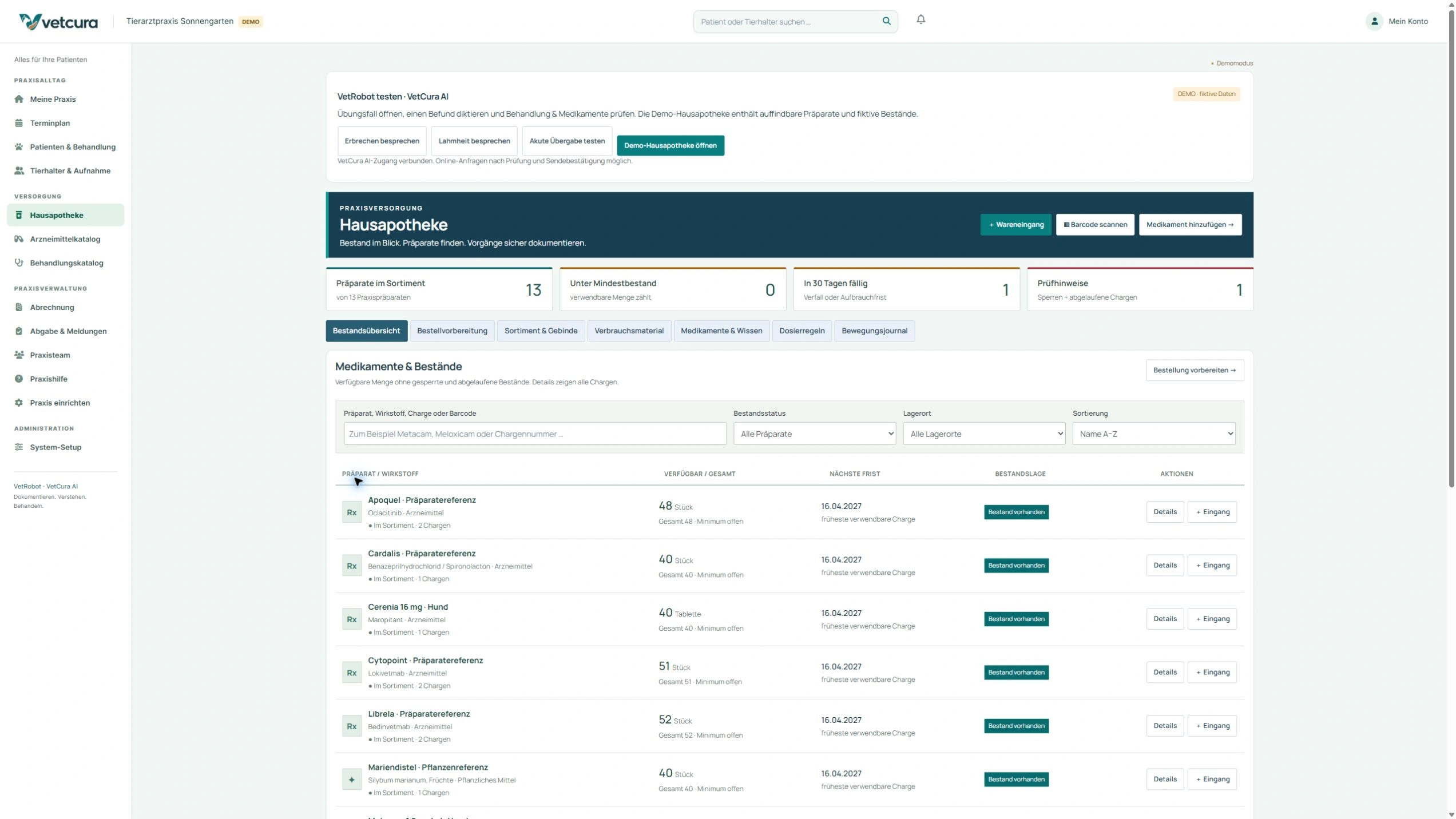
Medication and the in-house veterinary pharmacy
From prescription
to stock records.
What does the patient need? What is in stock? What was actually dispensed? Vetasur connects these questions in a traceable workflow.
01 · Select
Find the appropriate product.
Drug references, the practice formulary and your approved dosing rules can help prepare a prescription. Weight and risks remain part of the veterinarian’s review.
02 · Prescribe
Make the agreed plan clear.
Edit the prescription, obtain veterinary approval and produce a clear medication plan for the owner.
03 · Dispense
Keep a traceable stock record.
Record actual administration or dispensing with the quantity and batch. Track expiry dates, in-use shelf life and minimum stock levels.
The pharmacy also covers packs, storage locations, barcode identification, consumables, a stock movement log and preparation of HIT exports. Prescribing and actual dispensing are recorded separately.
The practice interface
See the application in use.
See it on screen.
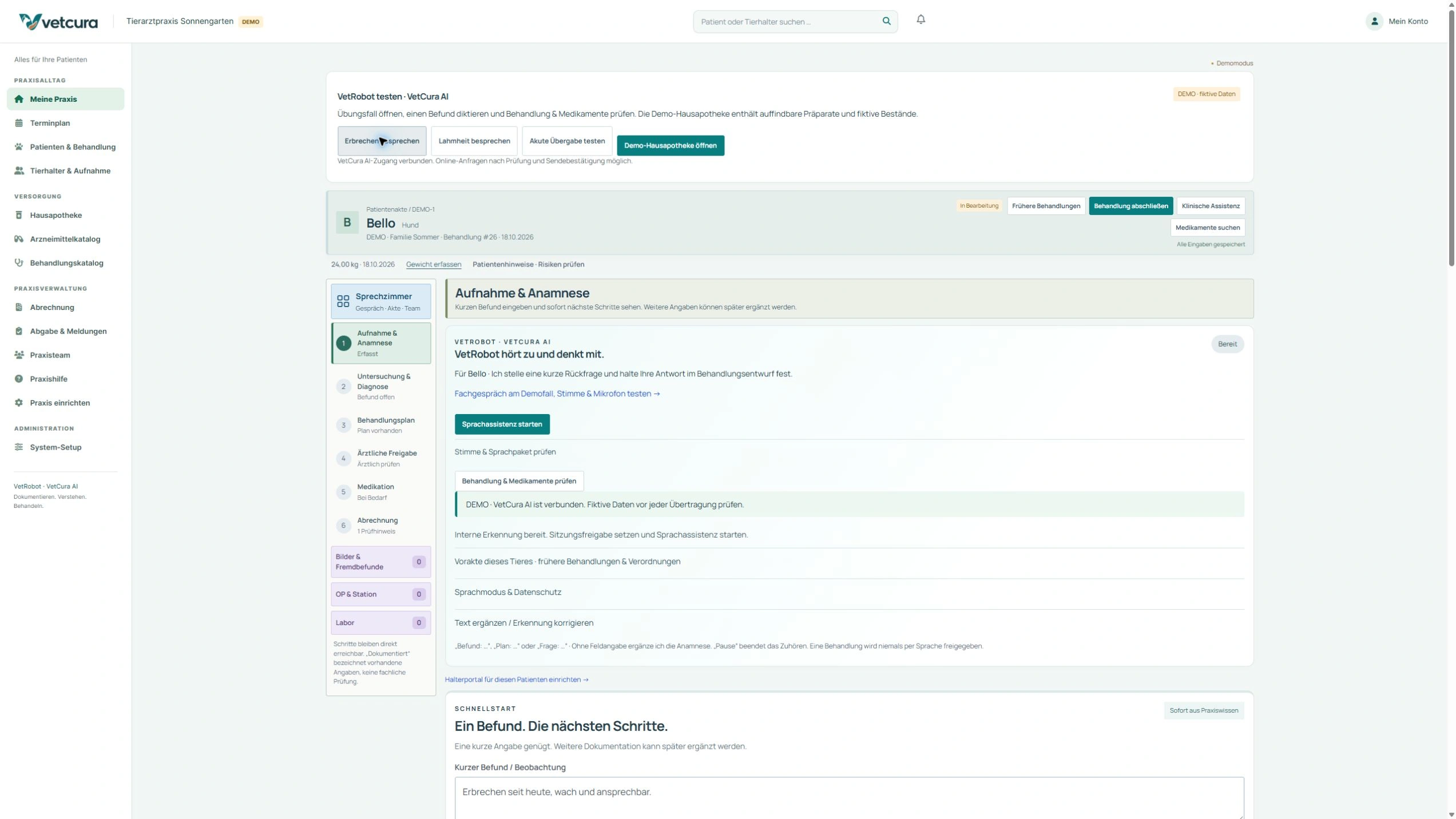
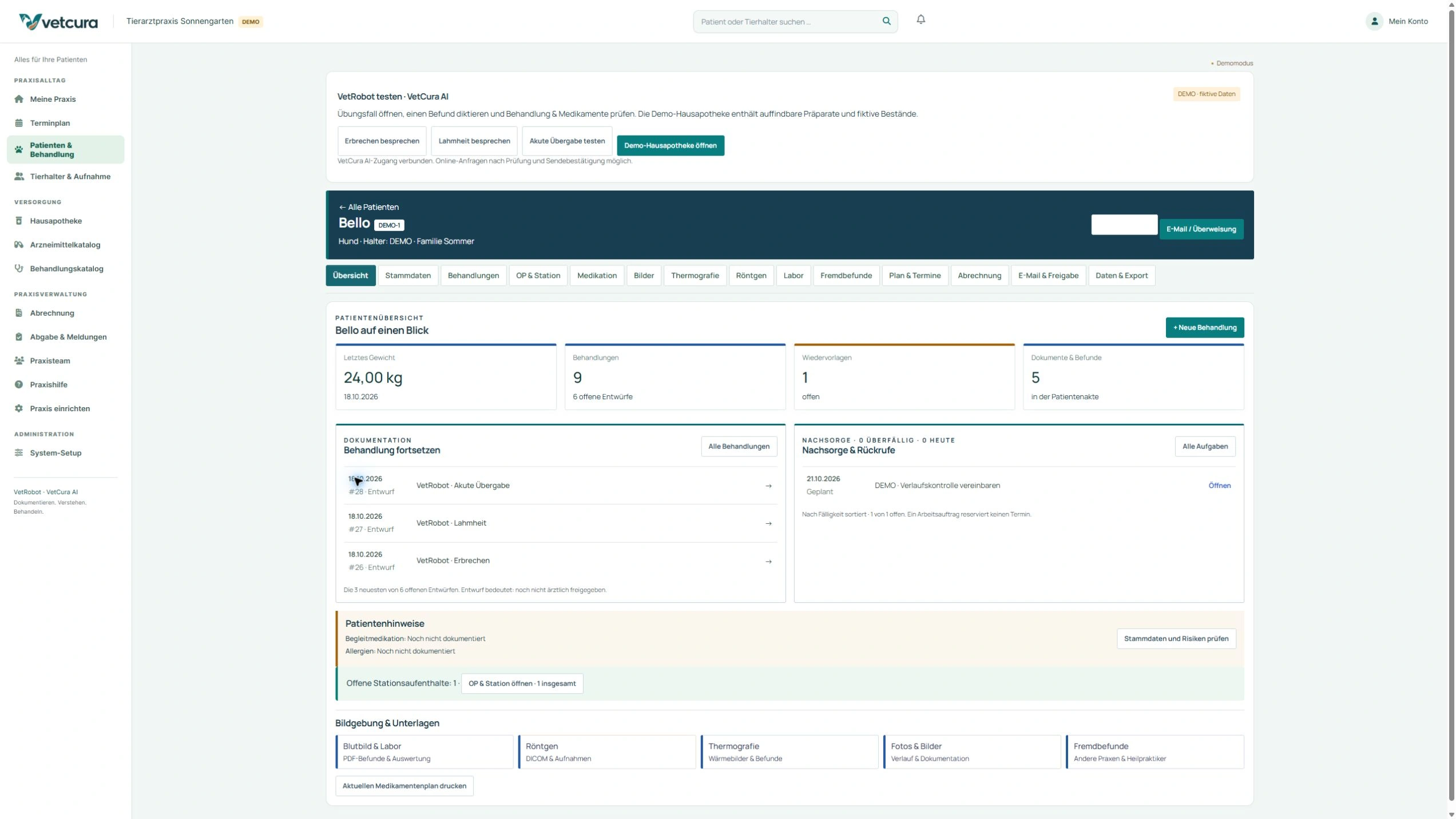
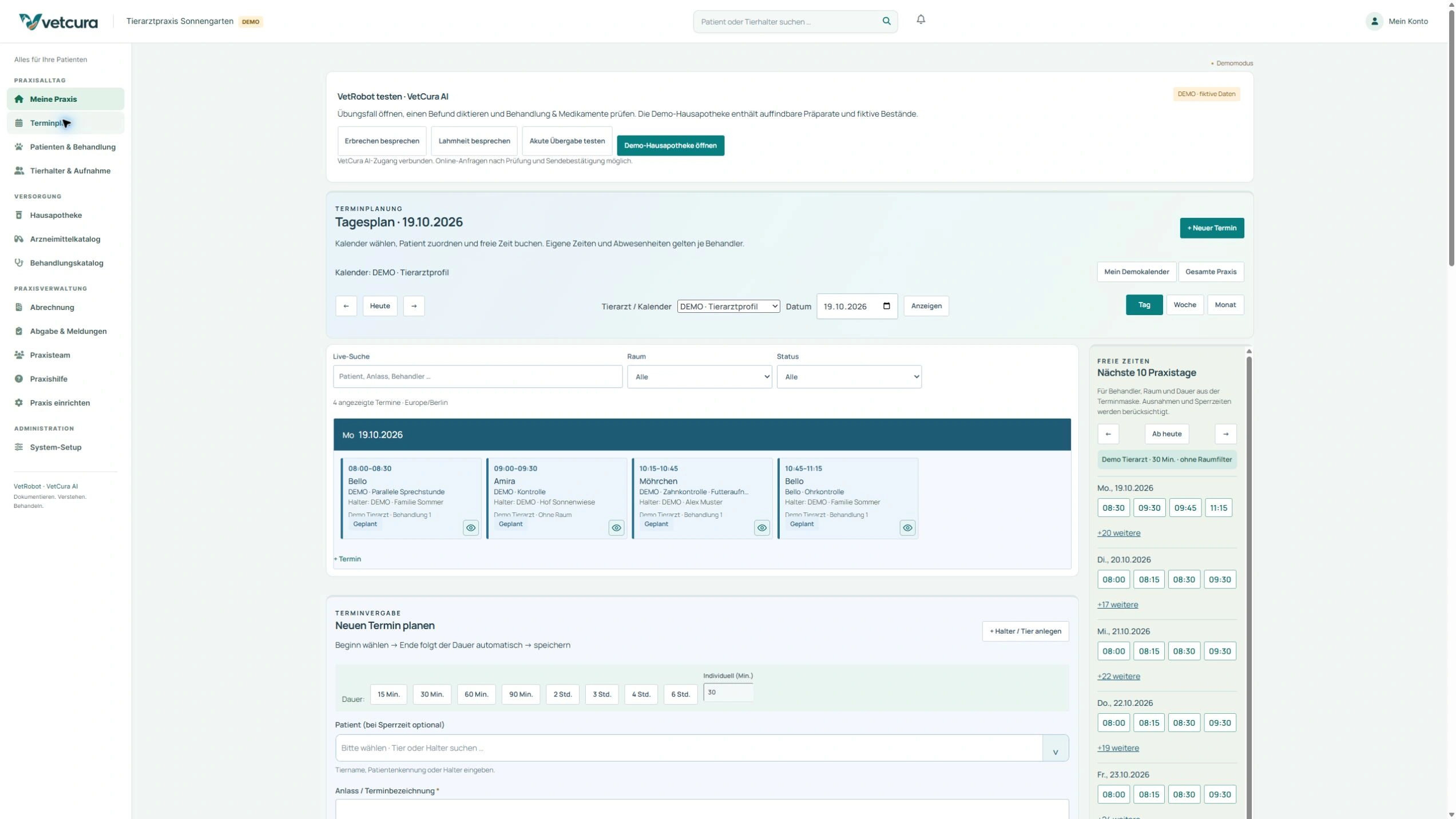
Screenshots use fictional data from a demo practice. Some images show the earlier product name. Choose an area to enlarge it. We agree optional modules and configuration for your practice.

Assistance with clear clinical responsibility
VetRobot listens.
Keep the whole case in view.
Dictate, discuss questions and review the case in context. VetRobot can prepare drafts for review and, if authorized, use a reviewed extract from previous records. You make the clinical decisions.
Support you can put to work
We configure AI access and permissions. Diagnosis, dosing and approval remain explicit clinical decisions.
Practice → Home visit → Office
One way to access your shared practice data.
Work online · Save centrally · Refresh the view
Stay connected to your practice
Work on the move.
Stay connected to your records.
Open a record on a home visit, take notes on a tablet or continue at your desk. Vetasur runs in a current browser. Saved information is held centrally and becomes visible when the relevant view is refreshed.
Why choose Vetasur with Dreamseven?
The software is the starting point.
Your workflow guides the setup.
01
Keep the workflow connected
Practice information, owner contacts and administrative tasks connect to the CRM for fewer separate records and clearer handovers.
02
Develop around your needs
Need to include a particular workflow or an existing system? We assess access and develop the appropriate extension.
03
Get started with personal support
We plan migration, setup and training with you. Dreamseven is your contact for the software and its implementation.
Plan the changeover with clear checkpoints
Your data.
The plan we agree together.
We can help prepare and migrate established patient records and workflows within an agreed scope. We review the data, test the migration and plan the changeover together.
01 Define requirements
Species, team, data and required integrations.
02 Test with examples
Check a test import and your key practice workflows.
03 Switch with support
Agree responsibilities, training and a start date.
Further details
Clear answers.
Before you get started.
What does Vetasur provide?
Vetasur is Dreamseven’s browser-based veterinary practice software. Patient records, calendars, treatment, pharmacy and billing share one interface. VetRobot, the owner portal, Surgery and Inpatient Care and additional device integrations can extend the agreed scope.
Can Vetasur be configured for our practice?
Yes. We configure individual calendars, rooms, roles, treatment templates, checklists, terminology, services and practice products. We discuss special workflows and additional development with you in advance.
Can the team work without AI?
Yes. Routine practice workflows, manual notes, local question guides and your templates work without generative AI. VetRobot is an optional addition with its own setup and authorization.
How does Dreamseven help with a software changeover?
We can prepare and migrate data within an agreed scope. We review exports, documents and mappings, perform a test migration and plan the cutover, training and acceptance together. Your team verifies the clinical mapping.
Can existing laboratory and X-ray equipment be connected?
We assess specific models, formats and authorized access. An integration for a separate Orthanc PACS includes a native DICOM worklist. The imaging server and actual devices need separate setup and acceptance. Lab connections depend on provider authorization and a suitable adapter.
Where can I see the features, plans and a demo?
At vetasur.de you can explore the product in more detail, Plans and pricing and the Demo request. Together, we review your practice workflow and agree the scope.
Explore Vetasur
Show us how your practice works.
Let us show you Vetasur.
Discuss your requirements with Dreamseven and explore Vetasur through a practical example case.
Vetasur in detail
Appointments, intake and team.
Appointments and practice overview
- Individual clinician calendars and a shared practice overview with filters for animal, room and status.
- Account for appointment duration, purpose, availability and conflicts. Record arrival and treatment status.
- Set opening hours, lunch breaks, public holidays, practice closures and room blocks.
- A Today overview with the schedule, waiting area, open tasks and care notes.
- Calculate the appointment end from its duration and check availability, breaks and overlaps when saving.
Intake and team
- Search for the owner and animal before creating records. Register new clients and patients together.
- Link multiple animals to one owner and reuse existing client information.
- Manage clinician profiles, working hours, holidays and absences.
- Plan follow-up care as a task or appointment with clear ownership and next steps.
A work order and a booked appointment are separate steps. Reminders require additional configuration. The Today overview shows the state when loaded and can be refreshed.
Vetasur in detail
Patient records and history.
Patient details and clinical context
- Record species, breed, date of birth, identifiers, sex and reproductive status.
- Record coat, origin, living conditions, diet, behaviour, insurance and other relevant details.
- Record allergies, concurrent medication, chronic conditions, organ-related risks, pregnancy and food-chain status.
- Track operations, implants, vaccinations, parasite prevention, blood group and dated weight records.
Keep everything with the right patient
- A patient overview bringing together treatments, medication, images, X-rays, thermography, lab results and external reports.
- Access plans, appointments, billing, approvals and data exports in separate, clearly accessible areas.
- Open previous treatments and unfinished drafts, and find follow-up care and callback tasks.
- Provide structured data exports for agreed downstream use.
Permissions define which information team members can view and edit. Full backups are managed separately from data exports.
Vetasur in detail
Consultations and clinical notes.
Document and decide
- Record history, examination findings, assessment, suspected diagnoses, further diagnostics and the treatment plan in separate fields.
- Use treatment catalogues and templates as checklists or planned actions.
- Use the terminology assistant, your own dictionary, favourites and text snippets for recurring wording.
- See unfinished entries and save notices, check treatment status and review earlier visits.
- The practice interface guides you through intake, examination, planning, approval, medication and billing.
- Start with brief findings in the quick-start view and use local question guides to develop the record. Enable additional AI assistance explicitly.
Approve and continue
- Record veterinary review and approval as a distinct step, with later additions kept as amendments.
- Access medication, billing, tasks and selected documents from the treatment context.
- Prepare a summary and next steps for handover.
- Assign follow-ups, checks and callbacks.
Templates support documentation. The veterinarian reviews findings, diagnoses and treatment decisions. Treatment approval, prescription approval and stock movements are separate steps.
Vetasur in detail
Medication. Stock. Traceability.
Reference research and prescribing
- Research drug references and herbal options while distinguishing reference information, the practice formulary and actual stock.
- Use your approved dosing rules, a dated weight and supported risk checks when preparing a prescription. The veterinarian reviews the current product information and the individual case.
- Adjust prescriptions individually and confirm veterinary approval with an additional PIN.
- Provide owners with medication plans and prescription records.
Pharmacy and consumables
- Manage products, packs, storage locations, batches, expiry dates and in-use shelf life.
- Document goods received, administration, dispensing, stocktakes and corrections.
- Use EAN/GTIN mappings and a barcode scanner to identify products.
- Identify low or expiring stock and prepare orders.
- Track consumables separately and assign actual use to the treatment and billing records.
Dispensing records and HIT
- Prepare records of relevant administration and dispensing with the product, pack, quantity and animal reference.
- Review HIT data before export and prepare the intended CSV format.
- Document feedback for the subsequent reporting step.
Prescribing, veterinary approval and actual dispensing are separate steps. HIT data is exported for a separate portal upload. Reporting periods and export formats are checked before setup. Licensed drug databases and special records require a separate review.
Vetasur in detail
Lab, imaging and PACS.
Lab and documents
- Keep lab orders, original reports and measurements with units and reference ranges in the patient record.
- Attach photos, PDFs and supported image files. Save annotated versions separately and preserve the originals.
- Assess existing devices and lab workflows by model, format, access and provider authorization. IDEXX workflows are prepared in a separate sandbox. A live connection needs its own acceptance testing.
PACS and DICOM worklist
- Connect a separate Orthanc imaging server for archiving, studies, series and protected image viewing.
- Send examination requests with unique patient, order and study identifiers to suitably configured devices.
- Match incoming images using their identifiers. Conflicts go to a review list before anything is assigned to a patient record.
- Use DICOM storage, queries, image retrieval and DICOMweb with the imaging server. The practice server needs its own backup and recovery plan.
Controlled referral sharing
- Share selected, reviewed record content as a snapshot with expiry and withdrawal controls.
- Keep internal notes and assistant conversations private. Publishing and sending require an explicit action.
The integration has been implemented and tested with synthetic images. A production imaging server, network access and acceptance testing for your specific devices require separate setup. Compatibility and diagnostic certification must be assessed for the actual deployment.
Vetasur in detail
GOT fees, invoices and administration.
GOT fees and draft invoices
- Record the service, time, actual circumstances, emergency service status and fee agreement in the case.
- Compile reviewed services actually delivered and materials used for billing.
- Prepare a draft invoice from the case in the connected CRM and review it before issuing.
- Distinguish planned actions from billable items.
- Document fee multipliers, service circumstances and any existing fee agreement. Handle PDF generation, issuing, sending and payment separately.
CRM and practice administration
- Maintain animal owners as shared client contacts.
- Create and assign projects and tasks for administrative work.
- Connect treatment, client relationships and the subsequent business workflow.
- Define custom reports, accounting exports or further automation together.
Planned treatment and a finished invoice are separate records. We agree tax settings, payment options and accounting integrations. Copied CRM tasks and clinical tasks currently maintain separate completion states.
Vetasur in detail
VetRobot: speak, structure and review.
Dictation and conversation notes
- Dictate history, findings and plans decided by the veterinarian into the relevant fields as drafts awaiting review.
- Prepare structured notes from conversation sections after providing information and obtaining approval. Recording starts explicitly and ends on stop, pause or leaving the view.
Clinical discussion within the case
- With the connection configured and use approved, discuss clinical questions. VetRobot can ask follow-up questions and structure proposed next steps as a draft for review.
- Pause to let the assistant process your contribution. The microphone stays off while it speaks.
- Optionally use a limited, reviewed extract from previous records. This additional online transfer requires separate authorization.
You review and add
- Explicitly add only clinically relevant content to the record. Previous suspected diagnoses and prescriptions require a fresh clinical decision for the current case.
- Local question guides, terminology and templates work without generative AI. Source research is a separate action. Routine clinical conversation does not automatically search live guidelines.
VetRobot is optional assistance. The responsible veterinarian performs the examination and makes diagnostic, prescribing and approval decisions. AI content may be incorrect. We configure the plan, access and data protection workflow.
Vetasur in detail
At your desk. On a tablet. During a home visit.
One shared set of practice data
- Work in a current supported browser on a computer, tablet or smartphone.
- Access saved records, appointments and documents according to your permissions. Other authorized users see the saved information after refreshing their view.
Connection and workstations
- An internet connection and suitable devices are required. The workflow described here requires online access.
- Supported text fields may offer personal recovery copies. Coverage varies by form. Regular saving and backups are still required.
- Test printers, scanners, device connections and voice functions on the workstations you actually use.
Device suitability must be checked. Open views may need refreshing to show the latest saved information.
Vetasur in detail
Migrate your data and plan the right integrations.
Plan how to bring your records across
- Review source systems, export formats, data volume and attachments together.
- Assess whether owners, animals, their relationships and relevant historical information can be migrated.
- Map fields and flag duplicates and unclear entries. Dreamseven can handle preparation within the agreed scope.
- Start with a test import, check samples and migrate to production after joint acceptance.
- Agree the time needed, possible interruptions, responsibilities and rollback plan in advance.
Your team’s part in the changeover
- Name a contact person, provide the required exports or authorized access and confirm the clinical mapping.
- Test key practice scenarios and allow time for training and acceptance. We handle technical implementation within the agreed scope.
Integrations and further development
- Existing APIs or suitable exports are the starting point for connecting third-party systems.
- Assess laboratory, imaging, accounting, appointment booking, communication and custom reporting against the access available.
- Agree data direction, update behaviour, permissions, licences, error handling and maintenance.
- Test new automation before approving it for use. Integrations need a suitable interface as well as authorized access.
You get an agreed scope with the expected effort and requirements. We assess data completeness and integration feasibility after reviewing the source data and interfaces.
Vetasur in detail
In-house pharmacy: find information and hand over clearly.
When a delivery arrives
Identify the product and pack, then record quantity, storage location, batch and expiry. A barcode helps identify the item. Check batch and expiry separately.
When medication is administered or dispensed
Document the approved prescription and actual administration or dispensing separately. Assign the quantity and batch and record the stock movement. A printed medication plan gives the owner the approved instructions.
When stock runs low
Identify low or expiring stock and prepare orders. Supplier orders are placed as a separate action.
When reviewing stock
Document stocktakes and corrections. The movement log records goods received, administration and dispensing. Consumables are tracked separately, and actual use can be assigned to the case.
When preparing a report
Review relevant dispensing data and prepare the intended HIT CSV export. Uploading it to the portal is a separate step. Direct transmission to the authority is outside this workflow.
Before setup, we review your practice-specific documentation duties, reporting periods and required special records together.
Vetasur in detail
Surgery, inpatient care and handover.
Preparation and inpatient stay
- Use the optional Surgery and Inpatient Care module for stays, preparation, procedures and recovery.
- Document responsibilities, tasks and manual observations with timestamps.
- Record measurements with their method and time, and print the saved inpatient care record.
Handover and closure
- Track open tasks, notes and next steps in the case history.
- Explicitly confirm completed tasks and case closure.
Surgery and Inpatient Care is an optional module for manual documentation. It does not provide automated anaesthetic monitoring, infusion control or discharge.
Vetasur in detail
Owner portal and follow-up care.
Before the visit
- Assign protected owner accounts to animals after an explicit check.
- Let owners provide observations, history and products already used. The team reviews the information before adding it to the record.
- Enable online booking for available consultation slots of 30 minutes within the configured scope. Availability and conflicts are checked again.
After the visit
- Explicitly publish reviewed follow-up guidance and approved medication instructions.
- Collect follow-up feedback through the configured workflow. A review appointment is booked separately.
- Provide profile details, invoices and contact options according to contact permissions. Internal records stay private.
The optional owner portal has its own sign-in area. Protected referral sharing provides a selected snapshot of information. We configure these access methods separately.
Vetasur in detail
Permissions, backups and operations.
Access and sharing
- HTTPS protects transmission, with individual user permissions for daily work.
- Routine entries use standard account access. Sensitive clinical approvals, actual dispensing and certain security actions require additional confirmation.
- Keep a clear record of amendments, external sharing and publication.
Back up and restore
- Agree the practice’s backup scope, schedule, retention and responsibilities.
- Use centrally managed Dreamseven backups with encrypted archives and malware checks within the configured scope.
- Test restoration. A separate PACS archive needs its own backup scope.
Malware scans support operational security. Endpoint protection is a separate requirement, and no setup guarantees complete security. We agree the service and operational scope before launch.